Note: If the package weight exceeds 4kg, the system will indicate that shipping is unavailable.
Solutions: 1. Split your purchase into multiple orders. 2. Please let me know the product model and quantity, and I will provide a quote that includes both the product cost and shipping fees.


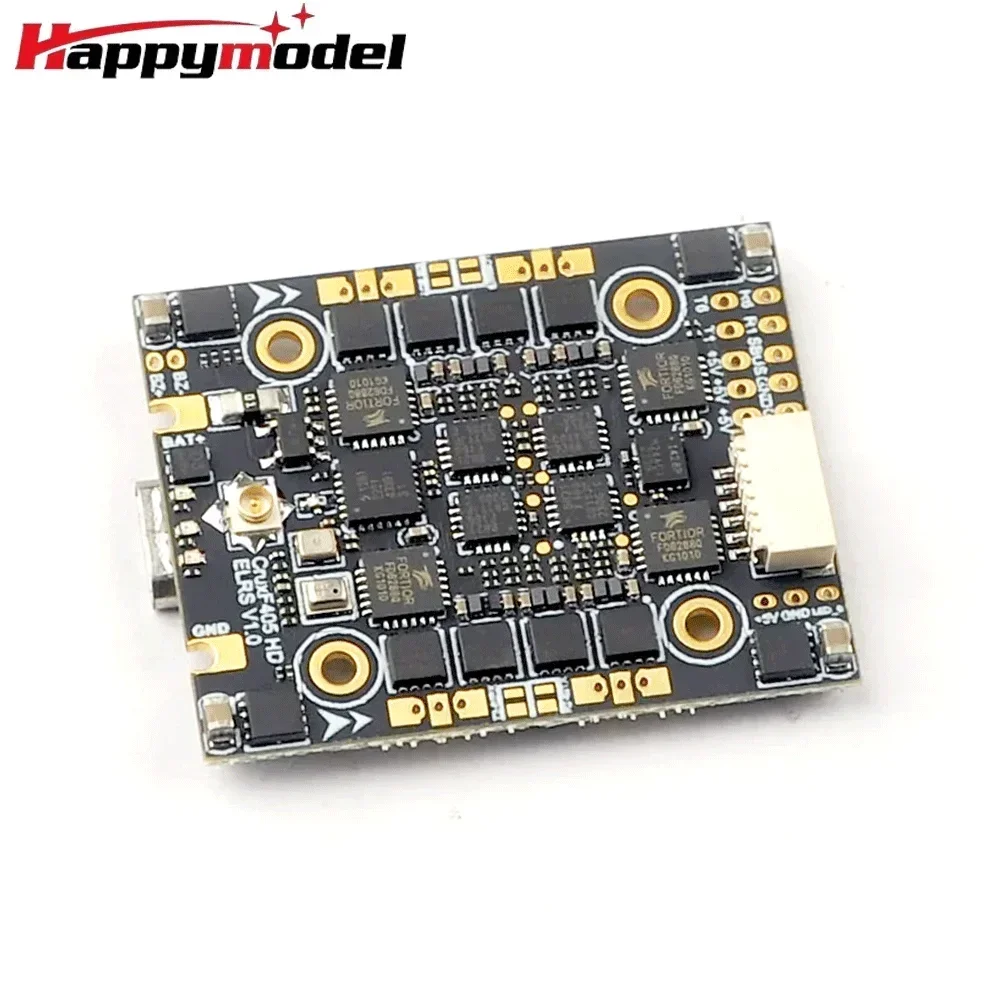
HappyModel CruxF405HD ELRS AIO
HappyModel CruxF405HD ELRS AIO
Normaler Preis
$52.66 USD
Normaler Preis
$0.00 USD
Verkaufspreis
$52.66 USD
369 auf Lager
Anzahl
Verfügbarkeit für Abholungen konnte nicht geladen werden
HappyModel CruxF405HD ELRS AIO Flight Controller 3-in-1 Built-in 20A ESC 2.4G ELRS Receiver 2-4S 20X20mm for FPV Toothpick Drone
- The Crux F405HD ELRS All-in-One Flight Controller comes with an onboard 2.4G ExpressLRS receiver and integrates a 20A Blheli_s ESC (pre-installed with Bluejay firmware), supporting 2~4S lithium batteries.
- Equipped with large-size MOSFETs, it can provide a continuous current of up to 20A, suitable for 2~4S toothpick drones and long-range FPV racing drones. A 6-pin socket is reserved to support plug-and-play of DJI HD FPV equipment, making it an optimal solution for building HD digital FPV racing drones.
Product Specifications:
- Flight Controller Main Board
- - MCU: STM32F405RGT6 (168MHz, 1MB FLASH)
- - Gyroscope: ICM42688 (SPI interface)
- - Mounting Hole Spacing: 20mm×20mm
- - Power Input: 2~4S battery (DC 8.7V~17.4V)
- - Built-in 4-in-1 20A Blheli_S ESC
- - Built-in Serial 2.4G ExpressLRS Receiver (default connected to UART2)
- - Built-in BMP280 Barometer
- - Built-in 8MB Blackbox Storage
- - Built-in Voltage Detection Sensor, Voltage Calibration Coefficient: 110
- - Built-in Current Detection Sensor, Current Calibration Coefficient: 470
- - Flight Controller Firmware Target: BETAFLIGHTF4
Onboard 4-in-1 ESC:
- - ESC MCU: Upgraded EFM8BB21
- - Supported Batteries: 2~4S Regular LiPo / High-Voltage LiPo (7V~17V)
- - Current Specification: 20A continuous current, 25A peak current (lasting 5 seconds)
- - Supports BLHeliSuite Software Parameter Tuning
- - Factory Firmware: Bluejay 0.19.2
- - Firmware Target: F_H_40_48_v0.19.2
- - Default Flight Controller Protocol: DSHOT150/DSHOT300/DSHOT600
Onboard 2.4G UART ExpressLRS Receiver:
- - Optional Packet Rate: 25Hz/50Hz/150Hz/250Hz/500Hz
- - RF Frequency: 2.4GHz
- - Antenna Interface: IPEX Connector
- - Telemetry Output Power: <12dBm
- - Receiver Protocol: CRSF
- - Default Firmware Version: ExpressLRS V3.0.1
- Onboard Voltage / Current Meter Parameters
- - Voltage Calibration Coefficient: 110
- - Current Calibration Coefficient: 470
Binding Procedure:
- 1. Power the flight controller via USB, wait until the red LED on the FC turns off, then power it off immediately and repeat the above operation;
- 2. When powering on the FC for the third time, the red LED will start to flash twice continuously, indicating that the receiver has entered the binding mode;
- 3. Ensure that the firmware of the ELRS TX module on the remote controller is version V3.x.x, and open the ExpressLRS.lua script in the 「Tools」 menu of the remote controller;
- 4. Click 【Bind】 to initiate binding. The red LED of the FC will first flash slowly and then stay on steadily, indicating successful binding;
- 5. If the red LED flashes three times after binding, you need to switch the state of the 「Model Match」 switch in the remote controller (from ON to OFF / from OFF to ON).
Receiver LED Status Explanation:
- - Red LED Steady On: Binding successful / RC link normal
- - Red LED Flashing Twice: Enter binding mode
- - Red LED Flashing Slowly: No RC signal received from the transmitter
- - Red LED Flashing Continuously Fast: ExpressLRS WiFi is enabled
- - Red LED Flashing Three Times: Model mismatch, need to switch the Model Match switch
UART Port Definition:
- - Factory Default: ELRS receiver connected to UART2
- - UART1 / UART6: Can be connected to HD FPV transmitter for MSP OSD subtitles
- - UART6: Can be connected to external GPS and other serial devices
- - IRX6: Inverted serial RX6, supporting SBUS signal input
Note: IRX6 and TX6/RX6 cannot be used at the same time
Notes:
- If upgrading the firmware to Betaflight 4.4.x version, you need to manually add the following custom parameters in the build configuration of the Betaflight Configurator:
- GYRO_SPI_ICM42688P, ACC_SPI_ICM42688P
- Otherwise, the gyroscope will not work properly.


If you want to enable Barometer , please connect to betaflight configurator and go to CLI command ,then type the following command:
resource I2C_SCL 2 B10
resource I2C_SDA 2 B11
set baro_bustype = I2C
set baro_i2c_device = 2
save